5NIPER SHOT EA MT4, M5
MT5
Buy NowMT4
Buy Now5NIPER SHOT EA
+9.81%Markets: XAUUSD, GBPAUD
Last Updated: Oct 22, 2026, 04:32 AM
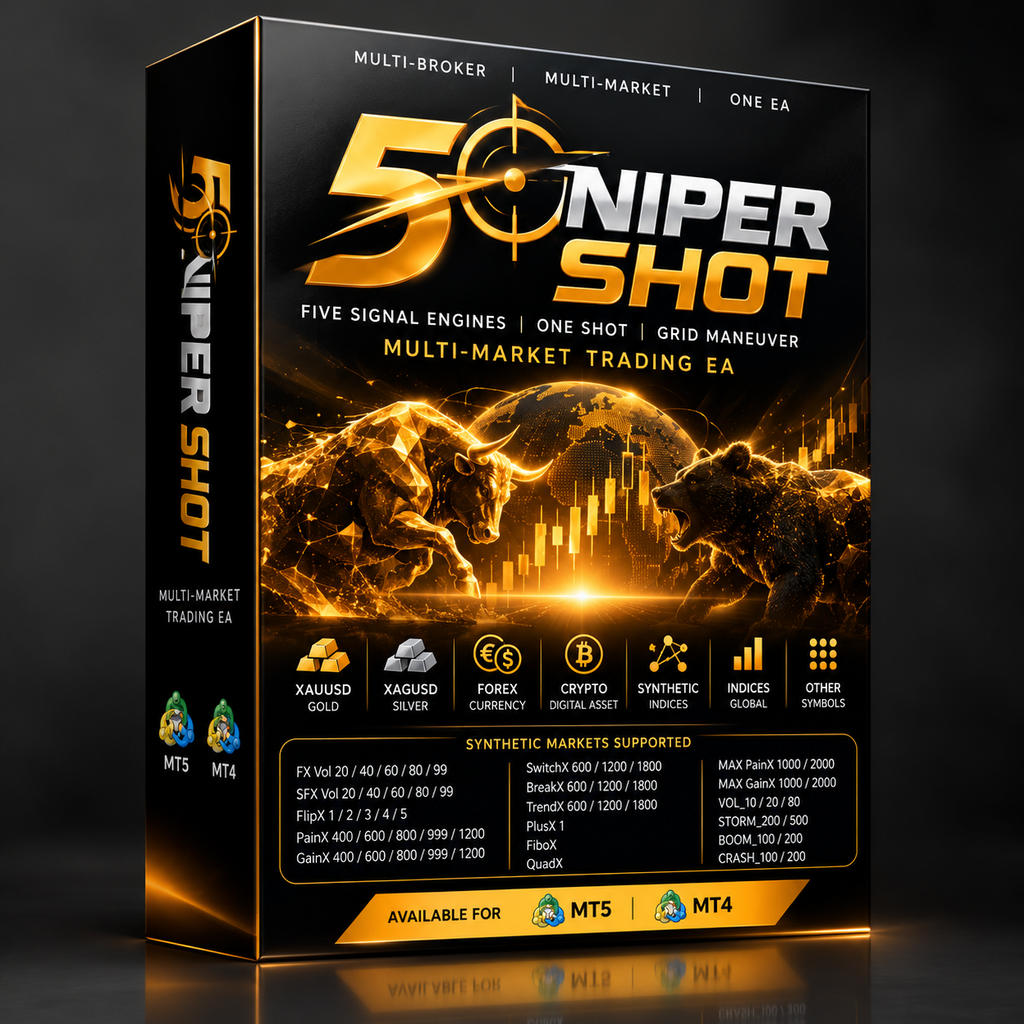
5NIPER SHOT – Multi-Broker Multi-Market Trading EA
5NIPER SHOT is a multi-broker, multi-market Expert Advisor designed to operate across a wide range of trading instruments, including Gold, Silver, Forex, Crypto, Synthetic Markets, Indices, and other supported symbols.
The EA combines five integrated signal engines with a unique One Shot + Grid maneuvering concept, creating a flexible automated trading system designed for different market environments.
⚠️ IMPORTANT: The EA is provided in a ZIP file. After downloading, please EXTRACT the ZIP first to access the Master EA file.
5NIPER SHOT is now available for both MetaTrader 5 (MT5) and MetaTrader 4 (MT4).
Five Signal Engines Built Into One EA
5NIPER SHOT integrates five signal engines directly into the EA.
There is no need to install five separate Expert Advisors. The signal engines are already incorporated into one complete trading system.
The five engines form the signal foundation of the EA, while the One Shot and Grid mechanisms provide the maneuvering structure for position management.
The system combines:
- 5 integrated signal engines
- One Shot entry logic
- Grid maneuvering
- Multi-symbol support
- Multi-market compatibility
- Multi-broker compatibility
- Flexible lot sizing
- MT4 and MT5 versions
One Shot + Grid Maneuver
The core concept behind 5NIPER SHOT is the combination of One Shot and Grid maneuvering.
One Shot
The One Shot concept is designed to initiate a trading operation when the internal signal engines detect a trading opportunity.
Instead of immediately building a large series of positions, the initial operation starts from a single primary entry.
Grid Maneuver
The Grid component provides an additional maneuvering structure when the market develops differently from the initial entry.
Depending on the trading conditions and EA configuration, additional positions can become part of the overall maneuver.
This creates a combination of:
Signal → One Shot → Grid Maneuver → Position Management
The purpose is to give the EA a structured way to operate through changing market conditions rather than relying exclusively on a single entry.
Multi-Market Trading
5NIPER SHOT is designed for multiple categories of trading instruments.
The EA can be used with supported:
- XAUUSD – Gold
- XAGUSD – Silver
- Forex
- Crypto
- Synthetic Markets
- Indices
- Other broker-supported symbols
The exact availability of symbols depends on the broker and trading platform.
Synthetic Markets Supported
5NIPER SHOT is designed to support a wide range of synthetic instruments.
The available synthetic symbols shown in the supported market environment include the following.
FX Vol Series
- FX Vol 20
- FX Vol 40
- FX Vol 60
- FX Vol 80
- FX Vol 99
SFX Vol Series
- SFX Vol 20
- SFX Vol 40
- SFX Vol 60
- SFX Vol 80
- SFX Vol 99
FlipX Series
- FlipX 1
- FlipX 2
- FlipX 3
- FlipX 4
- FlipX 5
PainX Series
- PainX 400
- PainX 600
- PainX 800
- PainX 999
- PainX 1200
GainX Series
- GainX 400
- GainX 600
- GainX 800
- GainX 999
- GainX 1200
SwitchX Series
- SwitchX 600
- SwitchX 1200
- SwitchX 1800
BreakX Series
- BreakX 600
- BreakX 1200
- BreakX 1800
TrendX Series
- TrendX 600
- TrendX 1200
- TrendX 1800
Other Synthetic Symbols
- PlusX 1
- FiboX
- QuadX
MAX Series
- MAX PainX 1000
- MAX GainX 1000
- MAX PainX 2000
- MAX GainX 2000
Additional Synthetic Instruments
Depending on the broker and platform, 5NIPER SHOT can also be used with additional synthetic instruments such as:
- VOL_10
- VOL_20
- VOL_80
- STORM_200
- STORM_500
- BOOM_100
- BOOM_200
- CRASH_100
- CRASH_200
The exact symbol naming can differ between brokers.
For example, one broker may use VOL_80, while another broker may use a different naming convention for a similar synthetic instrument.
Always select the exact symbol provided by your broker.
A Large Synthetic Market Universe
With support for multiple synthetic categories, 5NIPER SHOT can be deployed across different synthetic market environments rather than being restricted to only traditional Forex pairs.
This gives users the flexibility to select from markets such as:
Volatility → Storm → Boom → Crash → Flip → Pain → Gain → Switch → Break → Trend → MAX Series
The availability of each instrument is broker-dependent.
Multi-Broker Compatibility
5NIPER SHOT is designed with a multi-broker approach.
The EA can be used across different broker environments, provided that the required trading symbols and platform specifications are supported.
The EA can be used with different account structures, including:
- Cent Accounts
- Standard Accounts
- Zero Accounts
- Raw Accounts
- Pro Accounts
- ECN-style Accounts
- Other supported account types
Broker conditions can vary considerably.
Before using the EA, users should check:
- Spread
- Commission
- Leverage
- Contract size
- Minimum lot
- Maximum lot
- Margin requirements
- Stop-out level
- Trading hours
- Symbol specifications
- Execution conditions
Capital Guide
For XAUUSD, a starting capital of approximately $1,000 can be used as a general reference for the default configuration.
For users who want a larger capital buffer, $3,000 or more is recommended as a starting reference.
$1,000 Capital Reference
The default configuration can be used as a starting point with approximately:
$1,000 / 1,000 account currency units
for XAUUSD.
$3,000+ Capital Reference
For users who prefer additional available margin and greater flexibility in position management:
$3,000+
can be considered as a higher-capital starting reference.
These figures are guidelines, not guarantees.
The appropriate capital and lot size depend on the trading instrument, broker, leverage, spread, margin requirements, volatility, and individual risk settings.
Flexible Lot Size
The lot size can be adjusted according to the available capital.
5NIPER SHOT is designed so that the default configuration can provide a ready-to-use starting setup without requiring complicated initial configuration.
For XAUUSD, the recommended minimum capital reference for the default configuration is approximately $1,000.
Users with larger or smaller accounts can adjust the lot size accordingly.
For synthetic markets, Forex, Crypto, Silver, and other instruments, the appropriate lot size can differ substantially because every symbol can have different contract specifications and tick values.
Cent, Standard, Zero, Raw & Pro Accounts
5NIPER SHOT is not limited to a single account type.
Depending on broker support, the EA can be deployed on:
Cent Account
Useful for users who want account values and position sizing structured around a cent-based account environment.
Standard Account
Suitable for conventional trading account structures.
Zero Account
Can be used where the broker provides a zero-spread or similar account structure, subject to the broker’s commission and execution conditions.
Raw Account
Suitable for broker environments offering raw or tight spreads with commission-based execution.
Pro Account
Can also be used with supported professional or pro account structures.
The most important factor is not simply the account name, but the actual trading specifications provided by the broker.
Designed for Multiple Trading Environments
5NIPER SHOT can be configured for different markets including:
XAUUSD
XAGUSD
Forex
Crypto
Synthetic Markets
Indices
Other Supported Symbols
This allows the same EA concept to be deployed across different market categories without requiring a completely separate system for every instrument.
MT5 & MT4 Versions Available
5NIPER SHOT is currently available in two versions:
5NIPER SHOT MT5
For users operating on MetaTrader 5.
5NIPER SHOT MT4
For users operating on MetaTrader 4.
Both versions are designed around the same core concept of five signal engines combined with One Shot + Grid maneuvering.
MT5 Installation Guide
- Open MetaTrader 5.
- Select File → Open Data Folder.
- Open the MQL5 folder.
- Open Experts.
- Copy the 5NIPER SHOT EA file into the Experts folder.
- Restart MetaTrader 5 or refresh the Navigator.
- Locate 5NIPER SHOT under Expert Advisors.
- Drag the EA onto your selected chart.
- Enable Algo Trading.
- Configure the available settings if required.
- Check the chart and Experts/Journal tabs to confirm that the EA is operating correctly.
MT4 Installation Guide
- Open MetaTrader 4.
- Select File → Open Data Folder.
- Open the MQL4 folder.
- Open Experts.
- Copy the 5NIPER SHOT EA file into the Experts folder.
- Restart MetaTrader 4 or refresh the Navigator.
- Locate 5NIPER SHOT under Expert Advisors.
- Drag the EA onto your selected chart.
- Enable AutoTrading.
- Configure the available settings if required.
- Check the chart and Experts/Journal tabs to confirm that the EA is operating correctly.
Important Before Live Trading
Every broker has different trading conditions.
The same EA settings can produce different results depending on:
- Broker
- Account type
- Leverage
- Spread
- Commission
- Contract size
- Execution
- Margin requirements
- Stop-out level
- Symbol specifications
- Market volatility
Synthetic instruments can also have their own specific trading characteristics.
Always verify the exact symbol specifications provided by your broker before deploying 5NIPER SHOT.
For new installations, testing on a demo account first is strongly recommended.
Risk Warning
5NIPER SHOT is automated trading software and does not guarantee profits.
Trading Forex, Gold, Silver, Crypto, Synthetic Markets, Indices, and other financial instruments involves substantial risk. You may lose part or all of your trading capital.
The One Shot + Grid structure can result in multiple open positions. During strong, prolonged, or unexpected market movements, floating drawdown and margin requirements can increase significantly.
Different brokers may produce different trading results because of differences in spreads, commissions, execution, leverage, contract specifications, and market conditions.
Past performance, backtests, demonstrations, or previous results do not guarantee future results.
Users are responsible for determining the appropriate capital, lot size, leverage, and risk configuration for their own trading account.
Only trade with capital you can afford to lose.
5NIPER SHOT
Five Signal Engines. One Shot. Grid Maneuver. Multiple Markets.
A multi-broker, multi-market Expert Advisor designed for:
XAUUSD • XAGUSD • Forex • Crypto • Synthetic • Indices • Other Supported Symbols
With extensive synthetic-market support including:
FX Vol • SFX Vol • VOL • STORM • BOOM • CRASH • FlipX • PainX • GainX • SwitchX • BreakX • TrendX • MAX Series
Available now for MetaTrader 5 and MetaTrader 4.