MAPPING BO — ALL PAIR v4 – MT5
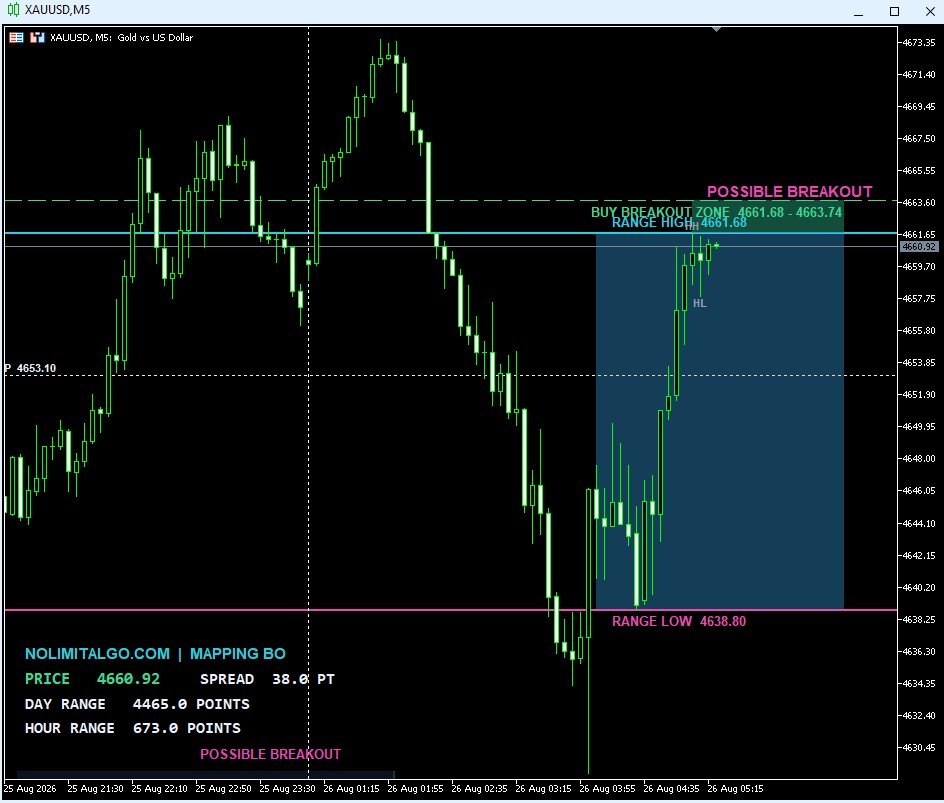
MAPPING BO — ALL PAIR v4
A lightweight MT5 price-action breakout indicator that maps dynamic ranges, breakout pressure, liquidity, retests, false breakouts, targets, and daily pivot levels—without relying on conventional technical indicators.
See the breakout structure before the move
MAPPING BO — ALL PAIR v4 is built for traders who want a clean visual explanation of current price structure. Instead of producing a signal from a moving average, RSI, MACD, ATR, or another external indicator, its mapping engine reads OHLC data, candle overlap, repeated boundary tests, rejection behavior, market structure, range compression, and price displacement.
The result is a practical chart map showing where price is consolidating, which boundary is under pressure, where a breakout zone begins and ends, and whether a completed move is behaving like a valid breakout, retest, continuation, false breakout, or exhaustion.
Main features
Dynamic Range Mapping
Automatically identifies a relevant recent consolidation using candle overlap, repeated highs and lows, compression, and current price location.
Breakout Pressure
Evaluates higher lows, lower highs, candle direction, boundary retests, rejection, and proximity to the active range.
True and False Breakouts
Requires price-action confirmation beyond a simple wick and detects when price closes back inside the mapped range.
Retest and Exhaustion
Tracks whether the broken boundary holds on a retest and warns when continuation momentum begins to weaken.
Targets and Invalidation
Displays normalized price levels for Target 1, Target 2, and structural invalidation without using ATR.
Liquidity and Structure
Maps nearby equal highs, equal lows, swing highs, swing lows, HH, HL, LH, and LL structures.
Daily Pivot Map
Shows P, R1–R5, and S1–S5 calculated exclusively from the previous trading day’s high, low, and close.
Realtime Information Panel
Displays running Bid price, spread, current-day range, and current-hour range with point-based measurements.
Clear breakout-zone pricing
The breakout zone is displayed as a price interval rather than repeating only the Range High or Range Low. For example, a buy setup may show BUY BREAKOUT ZONE 4673.52–4674.34. The first value is the range boundary and the second value is the outer zone limit. A separate dashed line makes that outer limit easy to identify.
- Range High: upper consolidation boundary.
- Range Low: lower consolidation boundary.
- Breakout Zone: the mapped area outside the relevant boundary.
- Breakout confirmation: determined from candle close, body dominance, displacement, rejection, and follow-through.
Stable internal market states
The state machine prevents a new message from being generated on every tick. Labels are distributed across adaptive visual lanes so nearby descriptions remain readable when the chart is zoomed or the symbol uses unusual price digits.
Built for different symbols and brokers
The indicator uses the active chart symbol and reads broker specifications dynamically. It does not hardcode XAUUSD, EURUSD, or any other market name. It is designed to support Forex, metals, indices, energies, crypto, CFDs, synthetic markets, and symbols containing broker prefixes or suffixes, provided that valid MT5 OHLC data is available.
- Automatic symbol digits, point size, and tick-size handling.
- Normalized mapping prices for different quote formats.
- Realtime refresh using chart calculations and a timer.
- No DLL, WebRequest, or third-party indicator dependency.
- No order placement or trade-management functions.
How to install MAPPING BO — ALL PAIR v4
- Download the MAPPING_BO_ALLPAIR_v4.ex5 file.
- Open MetaTrader 5 and select File → Open Data Folder.
- Open MQL5 → Indicators.
- Copy the downloaded EX5 file into the Indicators folder.
- Restart MetaTrader 5 or right-click Navigator and select Refresh.
- Attach MAPPING BO — ALL PAIR v4 to an M5 chart.
The default language is English. To display Indonesian descriptions, set InpEnglishLanguage = false in the indicator inputs.
Download MAPPING BO — ALL PAIR v4
Install the compiled MT5 indicator and start mapping current ranges, breakout zones, price-action pressure, retests, and false breakouts directly on your chart.
Important risk notice