BB LEVELS PRO v12 for MT5 – Indicators


For short-term scalping, attach BB LEVELS PRO v12 to the M1, M5, M15, M30, H1, or any other preferred timeframe.
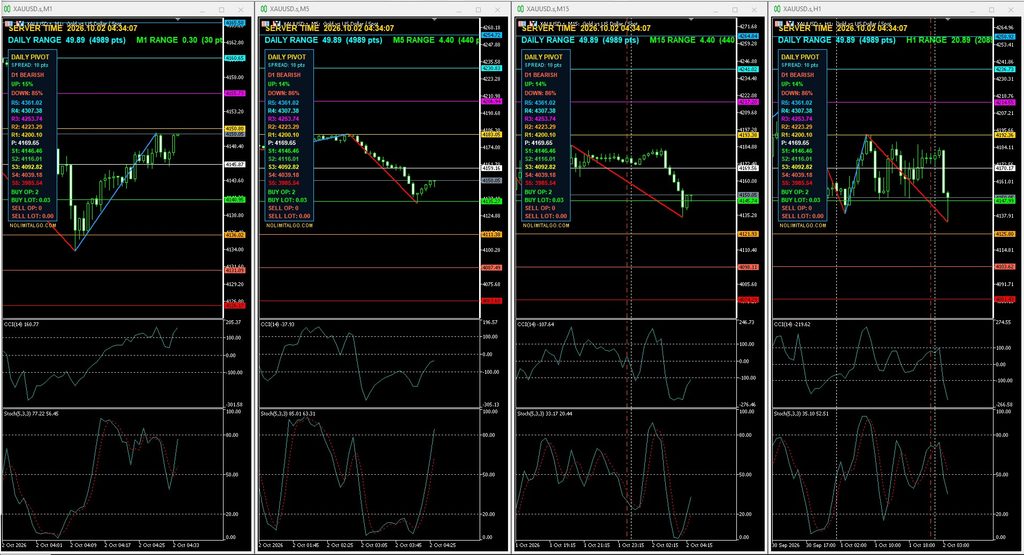
For broader market confirmation, open several charts of the same symbol, apply a different timeframe to each chart, and select Window → Tile Vertically in MetaTrader 5. This allows all selected timeframes to appear simultaneously, making multi-timeframe analysis faster and easier.
IMPORTANT: The EA is provided in a ZIP file. After downloading, please EXTRACT the ZIP first to access the Master EA file.
BB LEVELS PRO v12 for MT5: Multi-Level Bollinger Bands and Daily Pivot Dashboard
BB LEVELS PRO v12 is a MetaTrader 5 indicator designed to give traders a structured view of volatility, important price zones, daily support and resistance, and directional market conditions. It combines multi-level Bollinger Bands with an extended daily pivot dashboard, chart information, position monitoring, and automatic display controls.
The indicator is designed for traders who want important technical levels to remain visible without loading several separate indicators onto the same chart. Its price calculations are spread-neutral, while its broker-aware price normalization helps it adapt to symbols with different digits and tick-size specifications.
Main Features of BB LEVELS PRO v12
1. Four Bollinger Band Deviation Levels
Instead of displaying only one standard Bollinger Band channel, BB LEVELS PRO v12 calculates four separate deviation zones:
- Deviation 2.0
- Deviation 4.0
- Deviation 6.0
- Deviation 8.0
Each deviation includes an upper and lower level, together with the central Bollinger basis. This creates a broader volatility map that can help traders identify normal movement, extended price conditions, and unusually distant market zones.
The Bollinger curves can be shown or hidden. Traders may also customize the period, shift, applied price, colors, line style, and line width.
2. Locked Price Levels with Timed Updates
The indicator can display the latest Bollinger values as horizontal price levels. By default, these levels are refreshed every 30 seconds instead of moving on every tick. This produces a cleaner and more stable chart while still keeping the displayed levels current.
Users can choose whether the levels use the active candle or the most recently closed candle. The update interval can also be adjusted to suit different trading styles.
3. Spread-Neutral Level Calculation
BB LEVELS PRO v12 does not add or subtract the current spread from its Bollinger Band or pivot values. Bollinger calculations use chart price data according to the selected applied-price setting, while the daily pivot structure uses the previous trading day’s high, low, and close.
The current spread is displayed only as dashboard information. It does not shift the calculated technical levels. This separation is especially useful when working with symbols or brokers where the spread can expand significantly during rollover, volatile market conditions, or low-liquidity periods.
4. Broker-Aware Price Normalization
Displayed levels are normalized using the active symbol’s tick size, point size, and number of digits. The indicator does not rely on one fixed decimal format.
This makes BB LEVELS PRO v12 suitable for testing on many symbol types, including:
- Two-digit and three-digit symbols
- Four-digit and five-digit Forex quotations
- Gold and other metal symbols
- Broker symbols with prefixes or suffixes
- Synthetic instruments, subject to the broker’s available price history
Compatibility can still vary according to the broker’s symbol specification and historical data, so users should verify the displayed levels on a demo account before relying on them in live trading.
5. Extended Daily Pivot Levels
The built-in daily pivot dashboard calculates the standard central pivot and the main support and resistance levels from the previous daily candle. It displays:
- Central Pivot: P
- Resistance: R1, R2, R3, R4, and R5
- Support: S1, S2, S3, S4, and S5
P through R3 and S3 use standard floor-pivot relationships. The outer R4, R5, S4, and S5 zones extend the map using the previous day’s complete range. These additional zones help keep distant reference levels visible during high-volatility sessions.
6. Daily Directional Bias
The dashboard includes an always-visible D1 directional assessment. It classifies the current daily condition as:
- Bullish
- Bearish
- Mixed
Separate UP and DOWN percentage scores are displayed beneath the status. The assessment combines daily trend structure, momentum, directional strength, the previous-day pivot, the current daily open, and the location of price inside the current daily range.
The bias is intended as technical context rather than an automatic buy or sell instruction. Traders should combine it with their own entry rules, risk limits, and market analysis.
7. Live Spread Information
The dashboard displays the current spread in points using the label SPREAD. This information is updated for monitoring purposes only and remains separate from all Bollinger and pivot calculations.
8. Open Position and Volume Overview
BB LEVELS PRO v12 scans open positions on the active chart symbol and displays:
- Number of BUY positions
- Total BUY volume
- Number of SELL positions
- Total SELL volume
This compact overview helps traders monitor directional exposure without opening an additional panel. The indicator only reports the position information; it does not open, modify, or close trades.
9. Server Time and Range Information
The upper-left chart information can display:
- Current broker server time
- Current daily trading range in price and points
- Current chart-timeframe range in price and points
These values help traders quickly compare short-term movement with the wider daily range.
10. Daily Session Boundary
An optional vertical line marks the beginning of the broker’s current D1 candle. Its color, style, and width can be customized. This is useful because the broker’s daily session boundary may differ from the trader’s local midnight.
11. Automatic Chart Centering
The indicator includes optional vertical and horizontal chart-centering controls. Vertical centering uses the outer Bollinger structure and current market location to keep important zones visible. Additional padding can be configured to prevent the chart from appearing too compressed.
Horizontal centering can maintain automatic scrolling and chart shift, helping preserve space on the right side of the chart for current price action.
12. Customizable Visual Settings
Each Bollinger level can use its own color. Users can also configure information colors, dashboard font sizes, daily boundary appearance, line width, and line style. The dashboard uses a dark, high-contrast design with semantic colors so that resistance, support, bullish, bearish, and informational values are easy to distinguish.
The NOLIMITALGO.COM branding is positioned beneath the pivot dashboard so it remains visible without taking space from the technical data inside the panel.
How Traders Can Use the Indicator
BB LEVELS PRO v12 can support several forms of chart analysis:
- Volatility mapping: Compare price with the 2.0, 4.0, 6.0, and 8.0 deviation zones.
- Support and resistance planning: Use daily pivot levels as potential reaction, target, or invalidation areas.
- Directional filtering: Compare a planned setup with the current D1 bias.
- Range awareness: Review the daily and current-timeframe ranges before entering a position.
- Exposure monitoring: Check the number and total volume of BUY and SELL positions on the active symbol.
- High-spread conditions: Monitor the spread without allowing it to alter the displayed BB or pivot levels.
Suggested Setup
- Copy BB_LEVELS_PRO_v12.ex5 into the MetaTrader 5 MQL5/Indicators folder.
- Restart MetaTrader 5 or refresh the Navigator panel.
- Attach BB LEVELS PRO v12 to the desired chart.
- Choose whether to display Bollinger curves, locked price levels, daily pivots, daily bias, and the daily boundary.
- Adjust the update interval, colors, and chart-centering settings if required.
- Test the indicator on a demo account and compare its displayed levels with the symbol specification provided by the broker.
Important Notes
- The indicator requires sufficient chart and D1 price history to calculate its levels correctly.
- Daily pivot values depend on the broker’s D1 session and may therefore differ between brokers.
- The D1 bias is an analytical measurement, not a guaranteed market forecast.
- The indicator does not execute trades or manage risk automatically.
- Spread is shown for information but is excluded from BB and pivot level adjustments.
Conclusion
BB LEVELS PRO v12 brings together multi-deviation Bollinger Bands, an extended daily pivot map, daily directional context, range information, exposure monitoring, and chart-display tools in one MT5 indicator. Its spread-neutral calculation approach and tick-size normalization are designed to keep the displayed technical levels consistent across a wide range of broker symbol formats.
For traders who prefer a clean chart with clearly organized volatility and pivot information, BB LEVELS PRO v12 provides a practical framework for analyzing market location before making an independent trading decision.
Risk Disclaimer: Trading Forex, metals, synthetic instruments, and other leveraged products involves substantial risk and may not be suitable for every investor. This indicator is provided for analytical and educational purposes only. It does not guarantee accuracy, future performance, or profitability. Always test tools on a demo account and use appropriate risk management before trading with real funds.